Giving someone access to your Facebook Page, Instagram account, or Meta ads should not mean giving away ownership of your business accounts.
The goal is simple: your business keeps control, and your marketing agency gets the access it needs to do the work.
Here is the easiest way to think about it.
Your business should own your Meta accounts.
Your business should own:
• Your Facebook Page
• Your Instagram account
• Your Meta ad account
• Your Meta Business Portfolio
Your marketing agency should be given access to those accounts, not ownership.
That way, if you ever change agencies, your business keeps everything.
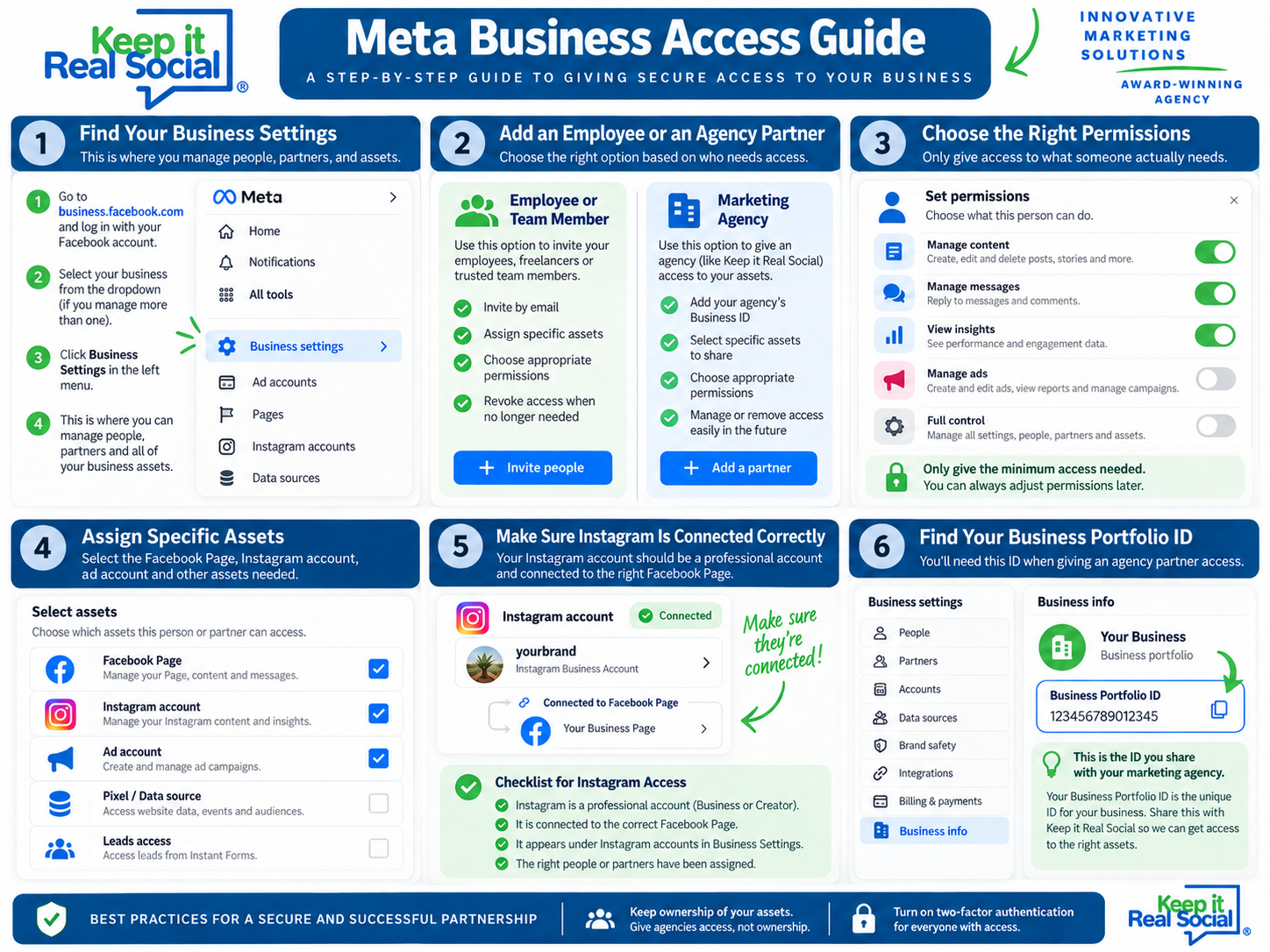
Start in Meta Business Settings
Meta Business Settings is where you manage people, partners, accounts, and permissions.
This is different from the everyday Meta Business Suite dashboard you may use to schedule posts, answer messages, or view insights.
Business Settings is where you control who has access to what.
Are you adding an employee or an agency?
This is an important distinction.
If you are adding an employee, team member, or freelancer, you can usually add them under People.
If you are giving access to an outside marketing agency, it is usually better to add the agency as a Partner.
This lets the agency manage its own team without requiring you to add every employee individually.
It also makes it easier to remove access later if needed.
Only give access to what is needed.
You do not need to give everyone full control.
For example, someone managing your social media may need access to:
• Your Facebook Page
• Your Instagram account
• Messages and comments
• Insights
Someone running ads may also need access to your ad account.
For more advanced advertising, they may also need access to your Pixel, Dataset, leads, or catalog.
The best rule is simple: only give access to what someone actually needs.
Make sure Instagram is connected correctly.
One of the most common Meta issues is that Facebook works while Instagram does not.
Your Instagram account should:
• Be a professional account
• Be connected to the correct Facebook Page
• Appear inside your Meta Business Settings
• Have the correct people or agency partner assigned to it
If your agency can post to Facebook but not Instagram, this is one of the first places to check.
Keep your ad account in your business.
Your business should generally own the ad account used to advertise your business.
Your agency can be given access to manage campaigns inside that account.
This helps keep your advertising history, billing, audiences, and reporting connected to your business.
You should not have to start over just because you change agencies.
Turn on two-factor authentication.
Anyone with access to your Meta Business Portfolio should have two-factor authentication turned on.
This offers another layer of protection to your business accounts.
It is especially important because business accounts can sometimes be compromised through someone’s personal Facebook account.
Keep at least two trusted people with full control.
It is a good idea to have at least two trusted people within your own business who have full control of your Meta Business Portfolio.
That way, if one person gets locked out, leaves the company, or loses access to their personal Facebook account, your business still has someone who can manage the account.
Review access regularly
Every so often, review who has access to your accounts.
Remove:
• Former employees
• Old agencies
• Freelancers who no longer work with you
• Anyone who no longer needs access
This is an easy step that can prevent bigger problems later.
Before giving an agency access, check these things.
Before you add a marketing agency, make sure you know:
• Who owns your Facebook Page
• Who owns your Instagram account
• Who owns your ad account
• Who has full control of your Business Portfolio
• Whether Instagram is connected correctly
• Whether old employees or agencies still have access
• Whether two-factor authentication is turned on
If you are unsure about any of these, it is worth checking before adding anyone new.
The most important thing to remember
Your agency should help manage your Meta accounts.
Your agency should not own them.
Your business ought to maintain control of its Facebook Page, Instagram account, ad account, and Business Portfolio while granting your marketing partner the access needed to do the job.
At Keep it Real Social, we help businesses sort out Meta access, permissions, Facebook and Instagram connections, and advertising accounts.
If you are not sure who owns your accounts or who currently has access, we can help you get everything organized before it becomes a bigger problem.